


How KEEP moves between your wallet and the game: deposits, withdrawal limits and statuses, authenticator 2FA, custody and proof of reserves.
On this page
- Quick facts
- Where your KEEP lives
- Depositing KEEP
- Withdrawing KEEP
- Who can withdraw
- Amounts, fee and limits
- Signing the request
- Standard withdrawals (24-hour wait)
- Instant withdrawals
- Statuses
- Why a payout might pause
- Two-factor authentication
- Authenticator app (TOTP)
- Lost your authenticator?
- Verified email
- Embedded wallets and private-key export
- Support
- Custody in plain words
- Proof of reserves
- Devnet today, mainnet later
- See also
This page explains how KEEP moves between your Solana wallet and your in-game balance, what the withdrawal limits and statuses mean, and how two-factor authentication (2FA) protects it. It also explains, in plain words, how the game holds your KEEP and how you can check that it is fully backed.
Everything here runs on Solana devnet. Devnet SOL and KEEP are test-net tokens with no real value. Nothing on this page is a mainnet promise.
Quick facts
- Deposits need only a signed-in wallet; no land. Your balance is credited once the transfer is finalized on chain (usually 15–30 seconds).
- Withdrawals need a Land Deed. Minimum 500 KEEP per request, 2% fee, one withdrawal per rolling 24 hours.
- Your daily withdrawal limit depends on your Keep: 50,000 KEEP at Keep 1 up to 250,000 KEEP at Keep 20.
- Standard withdrawals wait 24 hours (cancellable any time), then pay out automatically.
- An authenticator app enabled for 24 hours lets you skip the wait with an INSTANT withdrawal. Email codes never unlock instant.
- Lost your authenticator? STANDARD WITHDRAWALS NEVER NEED THIS CODE. Recovery lives behind LOST AUTHENTICATOR? — see below.
- The game server holds no signing keys. Payouts are signed by a separate signer with its own limits, and no KEEP leaves unless the custody wallet covers every player's balance.
- BUY KEEP WITH SOL is switched off.
Where your KEEP lives
Your in-game KEEP is a balance in the game's ledger, backed one-for-one by a custody wallet on Solana devnet. KEEP you deposit and KEEP you receive from play share one balance and one withdrawal allowance. Deposited KEEP is owed back to you and is never used to fund rewards.
SHARDS are the building currency. You can convert KEEP to SHARDS one way on the KEEP WALLET screen, but SHARDS can never be withdrawn; only the GOLD FORGE turns SHARDS back into KEEP. See Economy: SHARDS and KEEP.
The KEEP WALLET.
Depositing KEEP
Open KEEP WALLET → DEPOSIT KEEP, enter a whole-KEEP amount, and sign the transfer in your wallet. That is all.
Behind the scenes the game creates a deposit request with a one-time reference, your wallet signs an ordinary token transfer to the custody wallet, and your balance is credited only once that transaction is finalized.
- No land needed — only a signed-in wallet.
- Whole KEEP only. Send round amounts; fractions below 1 KEEP are not credited.
- The server decides when you are credited, not your device. The screen shows
pending → finalized → credited, orexpired/failed. - A request lasts 30 minutes. If you do not sign in time, start a fresh one.
Withdrawing KEEP
Open KEEP WALLET → WITHDRAW KEEP. The screen shows the exact quote before you sign: minimum, fee, what you receive, and whether the request is standard (24H, cancellable) or instant.
Who can withdraw
You need an active, paid land base — see Land Deeds and realm tiles. The destination must be an ordinary wallet address; the payout goes to that wallet's KEEP account.
Amounts, fee and limits
| Rule | Value |
|---|---|
| Minimum per request | 500 KEEP |
| Fee | 2% of the request; you receive 98% |
| Frequency | One withdrawal per rolling 24 hours per wallet |
| Daily cap | By Keep level (below), rolling 24 hours |
Example: a 1,000 KEEP request pays a 20 KEEP fee and sends 980 KEEP to your wallet. The fee stays with the game's books; it is not burned on chain.
If you have more than one base, the strongest active paid base sets the limit; limits never add up.
| Keep level | Daily cap (KEEP) | Keep level | Daily cap (KEEP) |
|---|---|---|---|
| 1 | 50,000 | 11 | 155,000 |
| 2 | 60,000 | 12 | 166,000 |
| 3 | 71,000 | 13 | 176,000 |
| 4 | 82,000 | 14 | 187,000 |
| 5 | 92,000 | 15 | 197,000 |
| 6 | 103,000 | 16 | 208,000 |
| 7 | 113,000 | 17 | 218,000 |
| 8 | 124,000 | 18 | 229,000 |
| 9 | 134,000 | 19 | 239,000 |
| 10 | 145,000 | 20 | 250,000 |
Cancelled and refunded withdrawals do not count toward your cap or your 24-hour wait. Each wallet has its own allowance.
Signing the request
Every withdrawal carries a fresh wallet signature over the exact request: amount, fee, destination, and standard or instant. The payout side checks that signature again before anything is signed. The signature is valid for 5 minutes.
Standard withdrawals (24-hour wait)
- You submit the request. The full amount is set aside at once; it cannot be spent or raided.
- The row shows UNBONDING for 24 hours. CANCEL at any time returns the full amount.
- When the wait ends, the payout is signed, sent and confirmed. The row becomes SENT with a transaction signature, or FAILED.
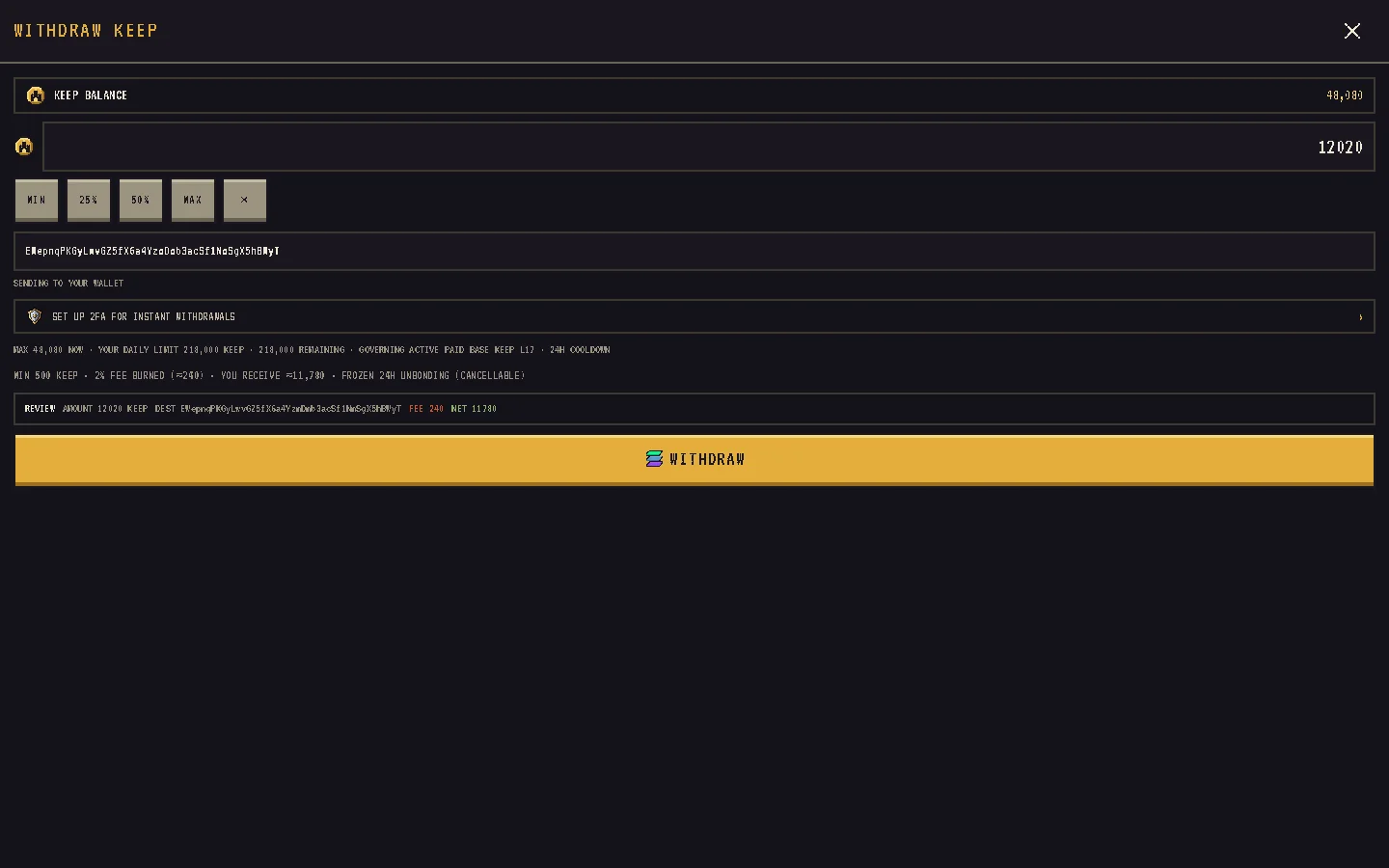
Instant withdrawals
An instant withdrawal skips the wait. It needs:
- an authenticator app (TOTP) on your account, enabled for at least 24 hours — the screen shows AUTHENTICATOR MATURING until then;
- a valid 6-digit code with the request;
- instant payouts to be open (they close only when payouts are paused).
Email codes never work for instant withdrawals. "Instant" means no 24-hour wait, not an immediate transfer: the request joins the payout queue within seconds (INSTANT WITHDRAWAL QUEUED FOR PAYOUT).
Statuses
| Status | Meaning | What you can do |
|---|---|---|
| UNBONDING | Amount set aside; waiting out the 24 hours (or the next payout pass if instant) | CANCEL |
| PAYOUT QUEUED | The wait is over; waiting for the payout | Nothing; it runs shortly |
| PROCESSING | The transaction is being signed or sent | Wait |
| SENT | Finalized on chain; signature shown | Check your wallet |
| FAILED | The payout did not land; your KEEP is still set aside | REFUND if offered, otherwise CONTACT SUPPORT |
| CANCELLED | You cancelled; amount returned | Nothing |
| REFUNDED | A failed row was refunded to your balance | Nothing |
REFUND appears only when the server can prove nothing was sent. If the outcome is uncertain, refund is blocked rather than risk paying you twice; CONTACT SUPPORT opens an email to support@pixelkingdomwars.com with the withdrawal id filled in. Failures that were the game's fault do not count against your cap or wait.
Why a payout might pause
- Coverage check. No KEEP leaves custody unless the custody wallet holds at least every player's balance plus everything set aside. If anything is unknown, it waits.
- Signer limits. The signer enforces its own limits per transfer, per wallet per day and across all payouts per day.
Two-factor authentication
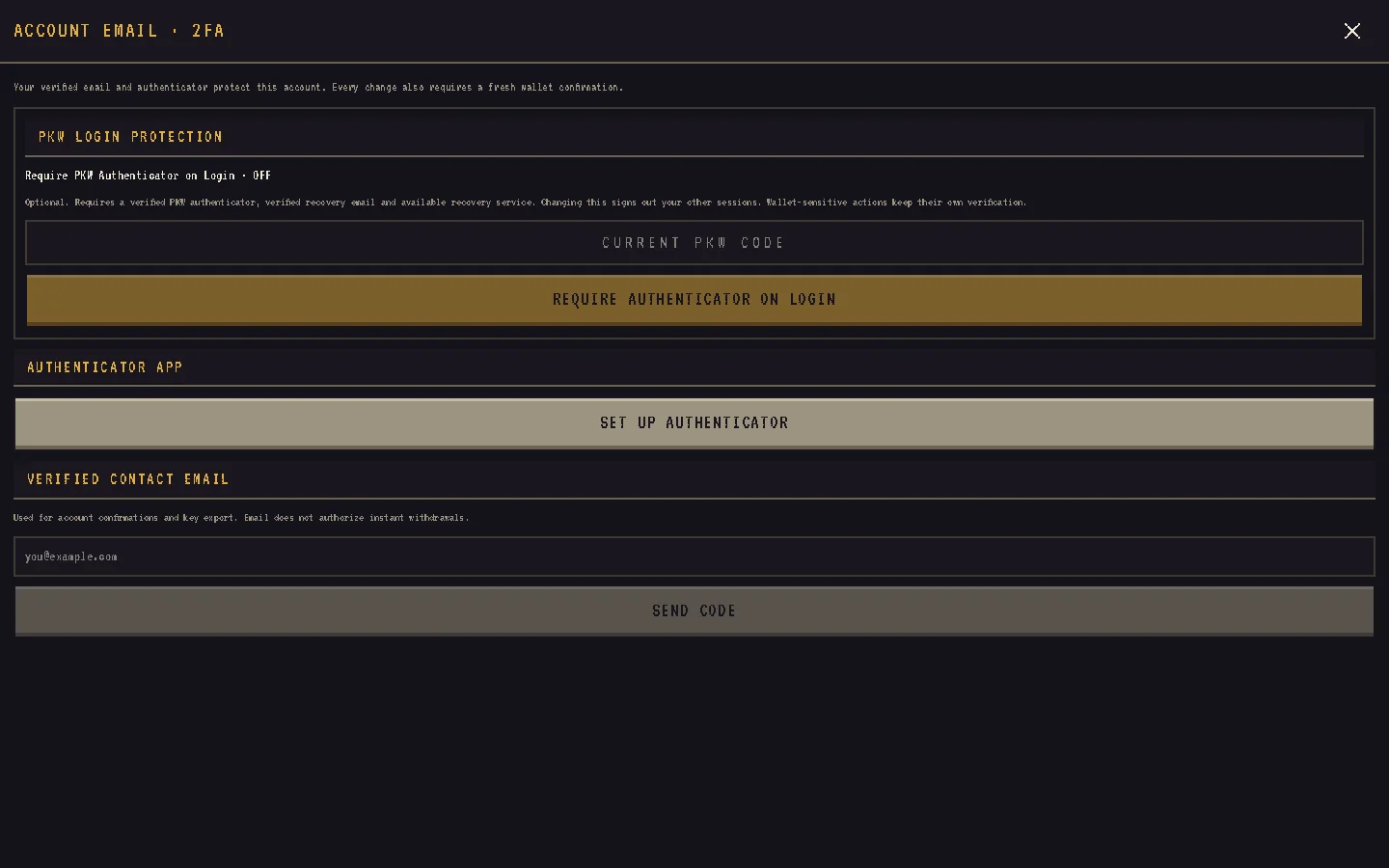
Open PROFILE → SECURITY & KEY EXPORT → ACCOUNT EMAIL · 2FA. Every change to a factor needs a fresh wallet signature, and once you have one factor, changing another also needs the first.
Authenticator app (TOTP)
Press SET UP AUTHENTICATOR, scan the QR code in any authenticator app, enter the 6-digit code and press VERIFY & ENABLE. You will see AUTHENTICATOR ENABLED · 24H SECURITY HOLD STARTED; after 24 hours it reads INSTANT WITHDRAWALS AVAILABLE.
- Codes are accepted within one 30-second step of the current time, and a code cannot be reused.
- 5 failed attempts lock 2FA for 15 minutes.
- DISABLE AUTHENTICATOR or re-enrolling restarts the 24-hour clock.
Lost your authenticator?
First: STANDARD WITHDRAWALS NEVER NEED THIS CODE. The authenticator only unlocks instant withdrawals, so a lost app never locks your KEEP. To replace it, use LOST AUTHENTICATOR? on the withdraw screen or the security screen. Automated recovery needs a verified email on the account; without one it goes through support.
- Start: prove the wallet and the email. An embedded (Google / X / email) wallet also needs Privy Wallet MFA first.
- The 24-hour wait. Confirming starts a 24-hour wait and a 7-day deadline. During it your other sessions are signed out, key export, factor and email changes and new withdrawals are blocked, and any withdrawal still UNBONDING is cancelled and refunded.
- Cancel: the current authenticator code cancels the recovery at once.
- Finish: after the wait, a second wallet proof and email code clear the old authenticator and sign out every session. Then enrol a new one; its own 24-hour clock starts from zero. Miss the deadline and the old authenticator stays.
This is the PIXEL KINGDOM WARS AUTHENTICATOR CODE. It is not Privy Wallet Security, the separate authenticator an embedded wallet uses for signing, export and new-device recovery — that one cannot be reset by anyone, so keep its setup key safe.
Verified email
Under VERIFIED CONTACT EMAIL, enter your address, press SEND CODE, then VERIFY EMAIL with the 6-digit code. Codes last 10 minutes, stop working after 5 wrong guesses and can be resent every 30 seconds.
A verified email is for contact, recovery, factor changes and key export. It never unlocks instant withdrawals.
Embedded wallets and private-key export
If you signed in with email or a social login, your wallet is an embedded wallet provided by Privy. You can export its private key after enrolling Privy's own wallet MFA: the EXPORT PRIVATE KEY screen asks you to SECURE WALLET WITH PRIVY MFA, then to sign a fresh challenge (plus your authenticator or email code if you have one) before REVEAL MY KEY.
The screen warns you, before you enrol and again at the reveal, that Privy Wallet Security is a separate authenticator nobody can reset. The key is shown inside Privy's own window; it never passes through the game's code or servers. Export is never tied to purchases or land — it is your right to your key.
Support
Wherever the game says "contact support" it shows EMAIL SUPPORT · support@pixelkingdomwars.com (with COPY ADDRESS) and DISCORD ↗. A SUPPORT chip with the same links sits under PROFILE › ABOUT.
Custody in plain words
- The public game server holds no keys.
- A worker decides which payouts are due and reserves each wallet's allowance.
- A separate signer, which cannot see the database, is the only process with the custody key. It logs every signed transaction and enforces its own limits whatever the worker asks.
- Devnet custody uses a file-based key; the configuration refuses mainnet without a remote signer and two independent RPC providers.
This is a devnet playtest: there is no mainnet deployment, no hardware custody yet and no third-party audit. See Smart contracts and on-chain.
Proof of reserves
The game publishes a public endpoint, /por, with the latest Merkle root, the reserve against total liabilities, and custody evidence. A signed-in player can fetch their own inclusion proof from /por/proof. Each week a snapshot builds a Merkle tree over every wallet's balance (plus withdrawals, Forge and mail amounts set aside) and posts the root on chain through the shardkeep-core program.
Only the custody wallet's own KEEP account counts as reserve. There is no in-game proof-of-reserves page yet; the KEEP ECONOMY screen shows the main totals.
Devnet today, mainnet later
- KEEP is a classic SPL token with 9 decimals on devnet, with its mint and freeze authorities still in place; the fixed supply with revoked authorities is a target, not today's chain fact.
- No mainnet game state exists.
- BUY KEEP WITH SOL shows TEMPORARILY UNAVAILABLE.
- Card on-ramps are not built. Swaps in the EXCHANGE tab of PROFILE › WALLET run on mainnet, are signed by you, and are not part of the game.